I tried to make this short so I wouldn’t bore anyone.
Most of the time you're using your right and left mouse button to select and move units/ vehicles. The little map at the bottom left of your screen is called the Mini Map: to the right of the mini map is a panel with nine buttons for doing other commands: (ex: last picture on this page)
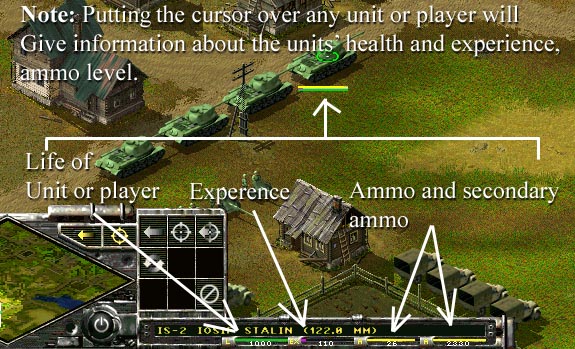
For example: On what was said above: Selecting a solder and then clicking the hold fire button tells him to not fire. As you get better you can use letters on your keyboard for using these same options rather then having to move your mouse courser to the bottom of the screen. If at any time you do not know what a button is, hover your mouse cursor over it and the name of the button will display in the long skinny bar (right of tool panel).
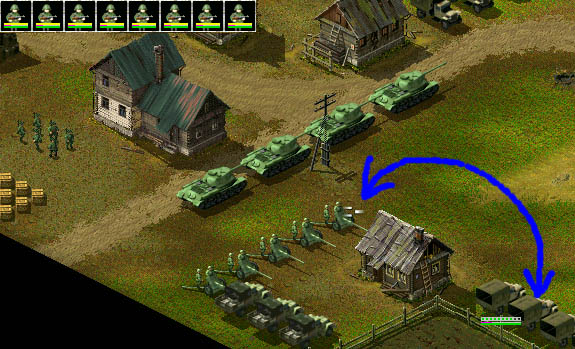
To do anything with your men and vehicles you must select the object first (object as in man or truck) and then tell it what to do, either right clicking at where the object should move or choosing an option from the tools menu: For example if you wanted to unload a gun off the back of a truck:
1. First select the vehicle, L-click on it |
 |
The above also works when unloading men, ammo from trucks or tanks.
Also: see how SHIFT Key works, (very important) here
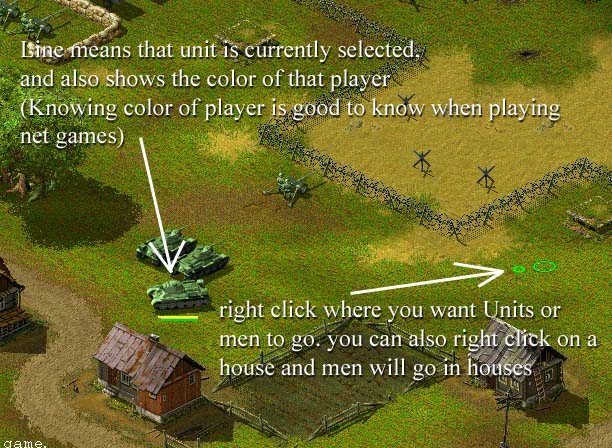
When you select a unit/or Vehicle, a line will show up under the unit or vehicle(s) selected, this is how you know what is selected from what is not.
To select more then one unit hold your left mouse button down and drag your mouse, this will form a rectangular selection box: Or you can hold your Ctrl key and select things randomly. Like for example if you only wanted to select one guy in a group where it would normally be difficult to select him because of all the other men around him.. Use your Ctrl key to do this.
The illustration below shows how to hook a field gun to a truck which was basically the opposite of what was said in the last example above about unloading/unhooking:
1. First select the truck by Left clicking on it
2. Put your cursor over the AT gun you want to pick up and when you see the silver clamps symbol, (Right click) The truck will then drive over to the gun and pick it up.
Note: You also use the above method to put men in houses, trucks, tanks and even put ammo boxes in trucks for transporting.
Also, note: when you click on a truck, the top left
of your screen shows you how many as well as what kind of infantry are in that
currently selected truck. To unload men from the truck, you can either click on
the men at the top left of the screen to unload a spcifice unit or you can hit the unload button in
the"panel". (bottom Left of screen) and just Right click
where you what the men to be unloaded and the truck will drive to that spot and
unload the men.
Note: you "Can Not" unload men from a truck if there is a gun
attached to the truck. you must first drop the gun attached before unloading the men.
Also: It's is a good idea to
keep supply boxes near AT guns, the men will get off their guns and refill there
own guns, this way the supply trucks can spend more time supplying and repairing tanks
since tanks can't resupply them selves. Supply trucks are
extremely important in this game, Protect them . They can also build things and
repair things like bridges and buildings and much more.
The Mini map shown below is used to tell where you are in the game as well as some other things:
Here is the deal: (Although this is not shown in the picture below) When you play a multi player game you must capture the zeppelin flags and hold them for about 2 min/s to get more reinforcements.
For example when you place something such as a (Truck, Tank, Man or Group of anything) close enough to a flag you will see a number appear on the side of the flag: this indicates that you are currently holding the flag, but until the flag actually turns black it has not been captured.
That flag should turn black after about two mins ( Default.) And then about two min's later you will get more reinforcments.
Some flags are grouped (meaning they are the same color which means you must get both or depending on how many are in one group ( all in that group)
Flags or better called Zeppelins show up as colored dots in the mini map. (Not shown below) During a multi player game a dot in the mini map with a (Red box) around it indicates a flag being held by the enemy: A dot with a (Green box) around it indicates a flag you or someone on your team is holding.
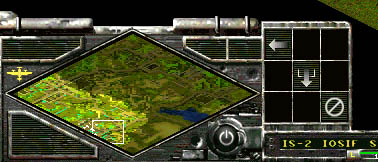
In a multiplayer game you can also do things like send a signal to your team mates by holding down the Ctrl key and left clicking somewhere in the mini map: Your team mates will see green circles flashing in the mini map indicating to them where you want them to look. This way you can tell anyone on your team where you might need help during a bad battle: They will see the flashes in their mini map indicating where you are pointing to.
If you have any questions, please email me: here
Mike G